Double Click Test
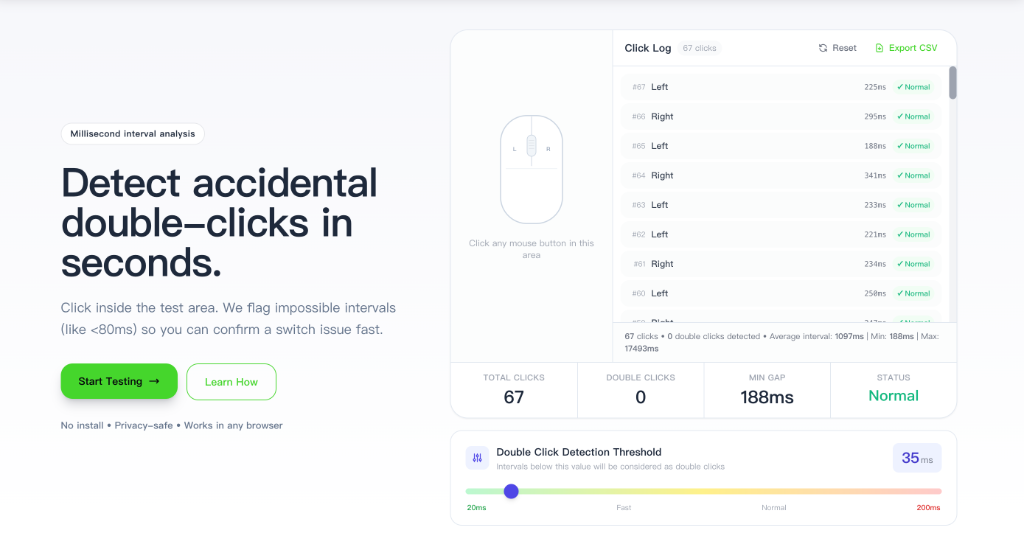
Click inside the test area. We flag impossible intervals (like <80ms) so you can confirm a switch issue fast.
No install • Privacy-safe • Works in any browser
Click any mouse button in this area
Click Log
Click any mouse button in this area
Intervals below this value will be considered as double clicks
What Is a Double Click Test?
Built like a performance dashboard: clear, fast, and brutally honest about what your switch is doing.
Precise Detection
Millisecond gap tracking with an adjustable threshold (20–200 ms).
All Mouse Buttons
Test left, right, wheel, back, and forward without installing anything.
Interval Log
See every click, every gap, and every flag. Export your results to CSV.
Instant Verdict
A clear status badge: Normal or Issue Detected, based on your threshold.
How to Use This Double Click Tester
A quick 30-second workflow. Click, review the gaps, and decide what to do next.

Start Testing
Open the test page and click any mouse button inside the click area 20–30 times. The tool supports left, right, middle, back, and forward buttons. You can adjust the detection threshold using the slider at the bottom — the default 80 ms works for most users.
Read Your Results
Each row in the click log shows the button pressed, the time gap since the previous click, and a status badge. Green (Normal) means the interval is within human range (100–500 ms). Red (Issue) means the gap fell below your threshold — a strong sign of worn-out micro switches. You can export the full click log as a CSV file from the top-right corner.
This double click test works by measuring the time interval between consecutive mouse button presses. When you click, the browser records the precise timestamp using performance.now(). A normal human click takes 100-500ms between presses. If the test detects intervals below 80ms (customizable threshold), it indicates potential hardware malfunction - specifically worn-out micro switches inside your mouse. For reliable results, we recommend testing at least 20-30 clicks.
More Mouse & Keyboard Testing Tools
Build your own troubleshooting checklist with quick, browser-based tests.
Click Speed Test
Measure CPSMouse Button Test
Test all 5 buttonsClick Counter
Count your clicksScroll Wheel Test
Check wheel responseRight Click Test
Test right buttonJitter Click Test
Test jitter techniqueKohi Click Test
Kohi PvP CPSButterfly Click Test
Two-finger CPSDrag Click Test
Measure drag clickDouble Click Test FAQ
Quick answers for common scenarios. Keep scrolling only if you need the details.